
跨域问题与 CORS 完全指南
如今的 Web 项目大多采用前后端分离架构,这使得跨域问题变得常见。
CORS(Cross-Origin Resource Sharing,跨域资源共享)是浏览器的安全机制。当前端(如 http://localhost:3000)请求后端(如 http://localhost:5000)时,因为域名/端口不同,浏览器会阻止请求,除非后端明确允许。
一、什么是跨域问题
同源策略
同源策略要求 协议、主机、端口 完全相同才可以互相访问。只要有一个不同,就不能访问。
注意:跨域限制仅在浏览器中生效。
如果浏览器访问 https://www.helloworld.net/special,在此页面中可以请求接口 https://www.helloworld.net/getSpecialList,因为它们的协议、主机和端口都相同,所以可以请求成功。否则,不可以访问。
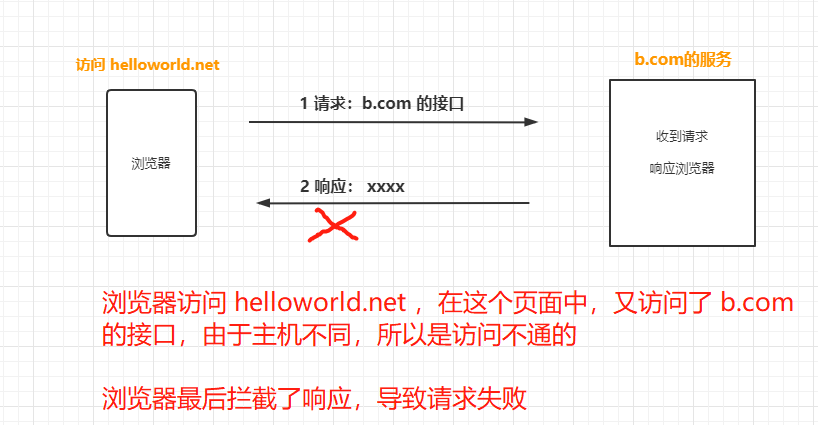
跨域问题的现象
如果出现跨域问题,浏览器控制台会提示:
1 | has been blocked by CORS policy: Response to preflight request does not pass access control check |
翻译过来就是:已被 CORS 策略阻止:对预检请求的响应未通过访问控制检查。
例如:
- 前端:浏览器正在访问
https://www.helloworld.net/special - 后端:请求接口
https://tiger-api.helloworld.net/v1/special/getSpecialList
因为域名不同,如果没有配置相关的跨域参数,浏览器会拦截响应,导致请求失败。
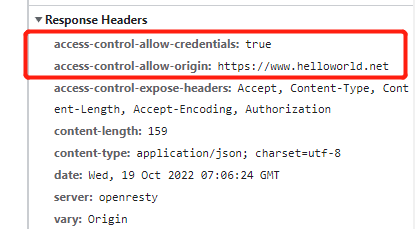
二、CORS 工作原理
浏览器拦截了响应,如果在响应头中添加一些特殊字段,浏览器看到这些字段后就不再拦截,从而解决跨域问题。
核心响应头
后端在响应时需要添加以下字段:
| 响应头 | 说明 |
|---|---|
Access-Control-Allow-Origin |
必须。值为请求的 Origin 或 *(接受任意域名) |
Access-Control-Allow-Credentials |
可选。布尔值,是否允许发送 Cookie。设为 true 表示允许携带凭证 |
Access-Control-Allow-Methods |
必须。逗号分隔的字符串,服务器支持的所有跨域请求方法 |
Access-Control-Allow-Headers |
可选。允许的自定义请求头 |
Access-Control-Expose-Headers |
可选。前端可访问的额外响应头 |
Access-Control-Max-Age |
可选。预检请求缓存时间(秒) |
其中最重要的是 Access-Control-Allow-Origin,设置为 * 允许所有域访问。
三、解决方案
方案一:后端配置 CORS(推荐)🔥
最根本的解决方案是在后端添加 CORS 配置。
1. 环境变量配置(.env)
1 | # 开发环境 |
2. Node.js 中间件配置
1 | const cors = require('cors'); |
3. 配置项说明
| 配置项 | 说明 | 常用值 |
|---|---|---|
origin |
允许的来源 | 函数动态判断或字符串 |
credentials |
是否允许携带凭证 | true/false |
methods |
允许的 HTTP 方法 | ['GET', 'POST', ...] |
allowedHeaders |
允许的请求头 | ['Content-Type', ...] |
exposedHeaders |
前端可访问的响应头 | ['X-Total-Count'] |
maxAge |
预检缓存时间(秒) | 86400 |
4. 前端配合配置
1 | // fetch |
方案二:开发环境代理(推荐)🔥
如果无法修改后端 CORS 配置,可以在开发环境配置代理。
Vite 项目
1 | // vite.config.js |
Webpack / Create React App
1 | // package.json |
方案三:Nginx 反向代理(生产环境)
在生产环境中,使用 Nginx 将前端和后端放在同一域名下:
1 | server { |
方案四:搭建自己的代理服务器
使用 Node.js 创建简单的代理:
1 | // proxy-server.js |
方案五:CORS 代理服务(仅开发测试)
利用第三方代理服务:
1 | const proxyUrl = 'https://cors-anywhere.herokuapp.com/'; |
⚠️ 不建议在生产环境使用公共代理,存在安全和稳定性风险。
方案六:JSONP(仅支持 GET 请求)
如果后端支持 JSONP:
1 | function jsonp(url, callback) { |
方案七:浏览器插件(仅开发调试)
安装浏览器扩展如 “Allow CORS” 临时禁用跨域限制,但这只在本地有效。
四、生产环境建议
对于生产环境,最佳方案是:
- 后端配置 CORS:最根本的解决方案
- Nginx 反向代理:将前后端放在同一域名下
- 云函数/Serverless:作为中间层转发请求
代理方式的本质是把跨域问题转移到服务器端,因为服务器之间的通信不受同源策略限制。
五、常见问题
Q:localhost 和 127.0.0.1 需要分别配置吗?
A: 是的,浏览器认为它们是不同的源,都需要添加到白名单。
Q:为什么 Postman 能访问但浏览器不行?
A: Postman 不受同源策略限制,浏览器会强制执行 CORS 检查。
Q:配置了 CORS 但还是报错?
A: 检查以下几点:
- 前端请求是否包含
credentials: 'include'或withCredentials: true - 后端是否设置
credentials: true - Origin 是否完全匹配(包括协议、端口)
- 是否正确处理 OPTIONS 预检请求
六、总结
- 同源策略:协议、主机、端口三者都相同才是同一个源,只有同源的资源才能互相访问
- 跨域问题本质:浏览器的同源策略造成,浏览器拦截了跨域响应
- 解决思路:在响应头添加相应字段,或使用代理将请求转到同源服务器
- 最佳实践:后端配置 CORS + 生产环境使用 Nginx 反向代理